Video Game Party Neon Game on Invitation: Editable Canva Template
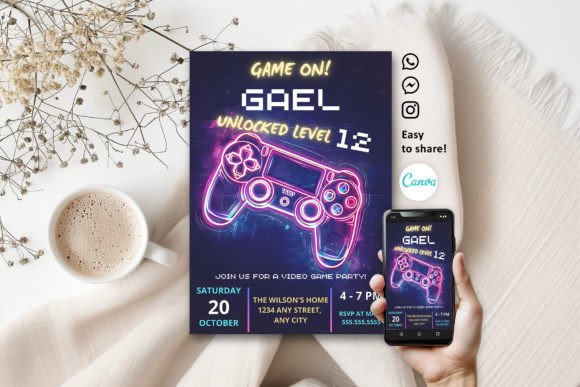
When planning an event that channels the electric energy of an arcade or a late-night gaming marathon, the visual identity of your invitation sets the stage. The Video Game Party Neon Game on Invitation template is designed specifically to capture that high-octane, nostalgic aesthetic. It is not merely a piece of stationery; it is a digital asset that mimics the glowing tubes of neon signage often associated with 80s and 90s pop culture, but applied to modern gaming themes. The visual style relies heavily on a dark background—usually deep black or midnight blue—to make the neon colors pop with maximum contrast. This creates an immediate focal point that draws the eye, ensuring your event details stand out.
The personality of this design is bold, energetic, and youthful, yet it appeals to a wide demographic, including adults aged 20 to 50 who grew up during the golden age of arcade gaming. It balances a sense of nostalgia with a clean, modern layout. Whether you are a parent planning a child’s birthday, a corporate team leader organizing a team-building game night, or a streamer hosting a community meetup, this neon game aesthetic communicates excitement instantly. It moves away from the stiffness of traditional serif fonts and embraces a display-centric approach where the typography acts as a piece of art itself.
Customizing Your Design in Canva
The true power of this product lies in its accessibility. Included in your purchase is a PDF file containing a link to a fully editable Canva template. This means you do not need expensive professional software like Adobe Illustrator or InDesign to create a polished result. You can access and modify this video game party design using your computer, laptop, or even your mobile device. Canva is a robust, cloud-based tool that allows for unlimited edits with no expiration, giving you the freedom to experiment with different color palettes or layouts until you find the perfect fit for your brand or event.
The customization options are comprehensive, allowing you to treat this template as a starting point for a fully realized brand identity. You have complete control over the typography; you can change the font style, size, and color to match your specific vibe. If the default neon text doesn't match your logo, you can easily adjust it. Furthermore, the template allows you to add new text boxes, reposition elements, and resize graphics. For those looking to add a professional touch, you can simply drag and drop your own logo, photos, or additional images into the canvas. This flexibility ensures that the final product looks bespoke rather than generic.
Strategic Applications for Designers and Creators
While marketed as an invitation, the Video Game Party Neon Game on Invitation template is a versatile design asset for various projects. For entrepreneurs and small business owners in the entertainment sector, this neon aesthetic can be adapted for social media graphics, story backgrounds, or event flyers. The high-contrast nature of neon text ensures excellent readability on mobile feeds, which is crucial for engagement metrics. If you are a content creator or streamer, using this style for your "Now Live" overlays or channel point rewards can create a cohesive visual hierarchy that keeps your audience immersed in your content world.
When evaluating the fit for your project, consider the "voice" of your event. The neon style is inherently modern and playful. It works exceptionally well for:
- Digital Invitations: Sending via email or social media messaging apps.
- Physical Prints: The 5" x 7" dimension is a standard photo size, making framing or card stock printing easy.
- Marketing Materials: Promoting gaming tournaments or tech store sales.
- Editorial Design: Headers for blog posts discussing gaming culture or tech reviews.
Technical Execution and Printing
Once you have finalized your edits in Canva, the next step is production. The template is optimized for both digital sharing and physical printing. You have several download options depending on your needs:
- PDF (Professional or Home Printing): This is the standard for high-quality prints. It preserves the vector data of the text and graphics, ensuring they remain sharp even when printed at the full 5" x 7" size.
- JPG: Best for professional printing services that require rasterized images or for quick previews.
- PNG: Ideal for digital use where you might need a transparent background, or for sharing on social media where compression artifacts are minimized.
For those printing at home, using a heavy cardstock (80lb cover or higher) will give the invitation a premium feel that matches the premium font aesthetic of the design. If you are using a professional printer, you can utilize the optional crop marks and bleed settings available in the download menu to ensure a perfect cut.
Final Thoughts on the Neon Aesthetic
In the crowded landscape of event planning and digital marketing, standing out is essential. The Video Game Party Neon Game on Invitation template offers a practical solution to a common design challenge: how to look professional without spending a fortune on a graphic designer. It bridges the gap between a script font's personal touch and a sans serif font's modern clarity. By leveraging the free tools within Canva, you can transform a simple template into a dynamic piece of communication that resonates with your audience. Whether you are printing a stack of cards for a party or creating a digital banner for a launch, this neon-centric design provides the visual impact needed to get your message across effectively.